
|
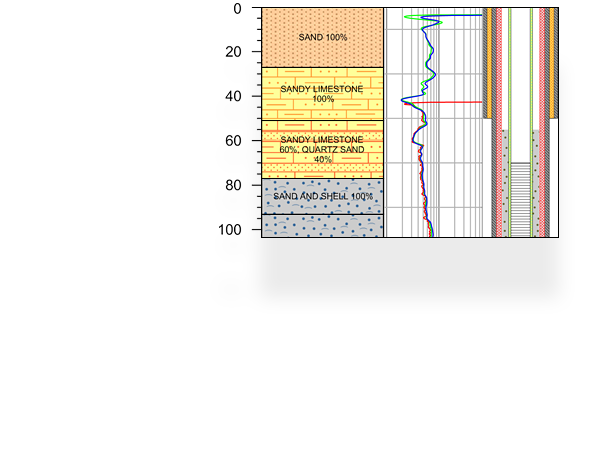
Strater 1 A Powerful and Innovative Well Log and Borehole Plotting Program for Geoscientists. Golden Software is excited to announce the release of Strater. Strater is a well log and borehole plotting software program that imports your data from a multitude of sources (database files, data files, LAS files, ODBC, and OLE DB data sources). Strater provides innumerable ways to graphically display your data. All the logs are fully customizable to suit your needs. Design and save template and scheme files to make log creation efficient and consistent, create multi-page continuous logs, and quickly display new borehole logs. Utilize the header and footer panes to store all the information about the logs, such as well number, driller, location, method, company name, and company logo. The flexibility Strater offers is unparalleled. Strater is written for use with Windows 98, Me, 2000, and XP. |
||||||||||||||||||||||||||||||||||||||||||||||||||||||||||||||||||||||||||
![]() |
|||||||||||||||||||||||||||||||||||||||||||||||||||||||||||||||||||||||||||
| Caratteristiche principali Flexible Borehole Design Strater offers unsurpassed flexibility in log design and layout. The advanced user interface makes designing and displaying your data easier than ever. Simply select the log type you want to create, click on the page where you want the log to be created, specify a data file and the import parameters, and the log is created! No other log plotting package in its class can create logs this easily! Customize your borehole designs by easily creating, editing, and updating illustrative and informative header, footer, and log items in their separate design areas. Strater includes 12 popular log types to graphically display your data. Each of the logs can be modified to suit your needs. The header and footer areas are ideal to store the detailed information about the logs, such as well number, driller, location, drilling method, company name, and company logo. Strater offers interactive point-and-click selection and modification of every item in your borehole design. We want to make sure you can have all your data and logs easily accessible in one project. Strater allows you to create multiple borehole views and data tables and store them all in a single project. Each borehole view can contain a different borehole design, allowing tremendous flexibility in the presentation of your data. You can easily switch between borehole views with a single click! You can also import and store data for multiple boreholes in one data table. Having the data for all your boreholes together allows you to switch between borehole names with a single click. When you change the borehole names, the logs update immediately and automatically with the new information! |
|||||||||||||||||||||||||||||||||||||||||||||||||||||||||||||||||||||||||||
| Software geologia Programma geologia Profondità Strato terra Falda |
|||||||||||||||||||||||||||||||||||||||||||||||||||||||||||||||||||||||||||
| Log Types Strater includes 12 popular log types to graphically display your data: zone bar, bar, percentage, graphic, well construction, lithology, post, classed post, complex text, line/symbol, crossplot, and depth logs. Strater logs give you full control over all log parameters. You can accept the Strater defaults to automatically create a log, or select a log and easily customize the log features in the Property Inspector.
|
|||||||||||||||||||||||||||||||||||||||||||||||||||||||||||||||||||||||||||
| Headers and Footers Utilize the header and footer design areas to include comprehensive text descriptions, linked text, imported image files, or drawing objects. You can set the header and footer areas to be any size you wish. You can create an exceptional and impressive log by importing company logos, icons, and artwork. You can also speedily click-and-draw and click-and-edit text, polygons, polylines, symbols, rectangles, rounded rectangles, squares, ellipses, and circles. All items can be fully modified, including font, color, size, fills, width, etc. Add text objects in header and footer areas that are linked to your database, such as borehole name, page numbers, field units, or field descriptions. When the borehole information is changed, this information automatically updates.
Create informative headers that display detailed information about the project, such as |
|||||||||||||||||||||||||||||||||||||||||||||||||||||||||||||||||||||||||||
| Database View Strater's integral tabbed database view allows you to import, display, enter, edit, sort, and print data. Import data from common spreadsheet and database formats, including: MDB, DBF, DB, LAS, XLS, SLK, WKS, CSV, TXT, DAT, BNA, BLN, ODBC, OLE DB, or other SQL data sources. Strater boasts full Excel import capability, which includes using multiple sheets from a single Excel file! You can import data for multiple boreholes into one data table, and you can create multiple data tables in one project. Available data table types include: collars, depth, interval, lithology, project information, text item, and well construction tables. You can rename any data table to descriptive names to keep your data organized, and you can export any data table to an ASCII text file. If source data files are updated with new information, you can automatically reload the data into Strater to update the logs! The database view provides the functionality needed to make sure you can get your data in the necessary format to create the logs you want. For example, if you have depth data, you can easily convert it to interval data to create zone bar, complex text, or lithology logs! You can define a new borehole in the data table and enter data for that borehole, or you can remove data for a particular borehole at any time. To help make creating a graphic log easy, you can insert a bitmap file path and file name into the database view with just a few clicks you dont have to remember and manually type in the file path and file name!
You can create multiple types of data tables in the database view |
|||||||||||||||||||||||||||||||||||||||||||||||||||||||||||||||||||||||||||
| Templates It is always easier to update a log with new data than to start from scratch. Using template files is an essential tool designed to make bulk log processing easy and efficient. Once a borehole is designed, you can reuse the design by saving it as a template. Template files store all the graphical features without the imported data, so you can create borehole designs to be easily reused in other projects or by other users. Use one of the many predefined template that come with Strater, or create your own specific to your needs! |
|||||||||||||||||||||||||||||||||||||||||||||||||||||||||||||||||||||||||||
| Schemes Schemes provide a way to load drawing properties based on a keyword or range value defined in the imported data. For example, a lithology log uses lithology schemes. The lithology scheme contains keywords, such as granite, clay, etc. Each of these keywords is assigned a fill pattern, contact line properties, line properties, and text properties. Schemes can be reused; therefore, you do not have to go through the time-consuming process of assigning the same properties each time you create a new log. Reusing template and scheme files is ideal for those who want to continue making the same looking borehole designs for a wide variety of borehole data. The Scheme Editor is where you link specific range values or keywords to display properties. |
|||||||||||||||||||||||||||||||||||||||||||||||||||||||||||||||||||||||||||
| Property Inspector The user-friendly Property Inspector allows you to interactively edit any object's properties. Select any object and the Property Inspector updates with the specific properties for that object. Once you make a change, you can see the affects of that change immediately in the borehole view without having to click any OK or Apply buttons!
You can easily edit all the properties of a selected |
|||||||||||||||||||||||||||||||||||||||||||||||||||||||||||||||||||||||||||
| Object Manager The object manager makes viewing and editing any object simple. It displays all the objects, organized by their design areas, in an easy-to-use hierarchical tree arrangement. Select objects in the Object Manager to easily edit them in the Property Inspector, or check and uncheck the check box to show or hide them.
Use the object manager to easily access and edit all |
|||||||||||||||||||||||||||||||||||||||||||||||||||||||||||||||||||||||||||
| Borehole Manager Use the Borehole Manager to manage the different borehole views contained in the project. Multiple borehole views are useful for displaying multiple graphics for multiple wells or displaying different layouts for the same data. You can add and delete individual borehole views and load and save template files quickly with the Borehole Manager!
Organize all your borehole views in the Borehole Manager. |
|||||||||||||||||||||||||||||||||||||||||||||||||||||||||||||||||||||||||||
Additional Features
|
|||||||||||||||||||||||||||||||||||||||||||||||||||||||||||||||||||||||||||
Import/Export Formats
|
|||||||||||||||||||||||||||||||||||||||||||||||||||||||||||||||||||||||||||
|
|||||||||||||||||||||||||||||||||||||||||||||||||||||||||||||||||||||||||||
Consulta i prodotti che possono aiutarti ad utilizzare al meglio Strater 1. |
|||||||||||||||||||||||||||||||||||||||||||||||||||||||||||||||||||||||||||
|
|||||||||||||||||||||||||||||||||||||||||||||||||||||||||||||||||||||||||||